Getting started
From zero to receiving live, decrypted data in a few minutes. You'll create a service, register an API client, drop in a config.json, install an SDK, and drain your first updates.
Prerequisites
- A company account on the allus business portal. Sign up at the portal if you don't have one. Running a live service — people connecting to it, its API client, its webhooks — needs the Basic level or above.
- A runtime for one of the six SDKs (see the install tabs below) — or, if you'd rather call the HTTP API directly, anything that can make HTTPS requests.
- A place to keep secrets: the service private-key PEM + its passphrase, and your client credentials.
1. Create a service in the portal
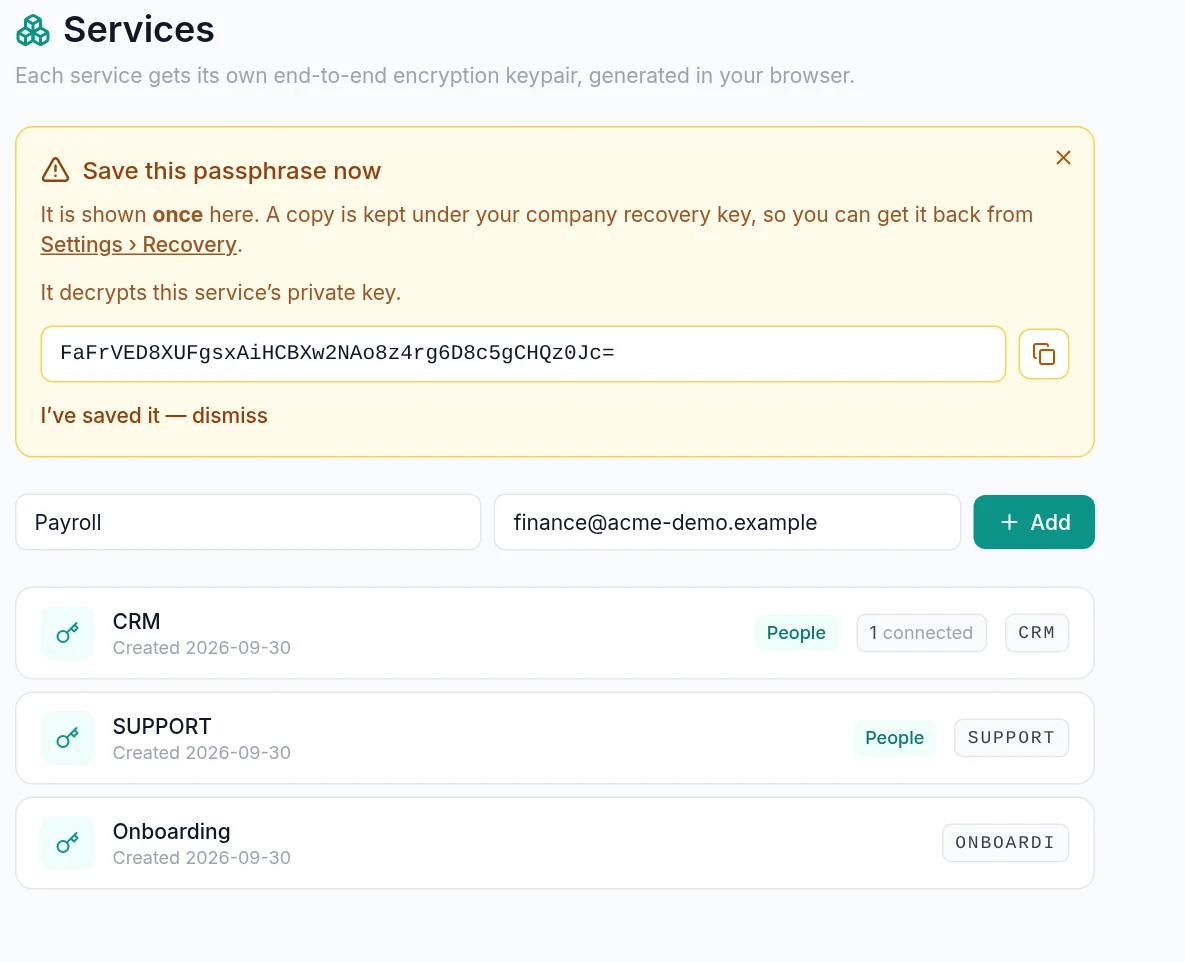
In the portal, create a service for your integration (e.g. "CRM"). Set its audience to b2p (business↔person) so people can connect, and note its share code — the second half of your connect handle, COMPANYCODE/SERVICECODE.
When the service is created, its private key passphrase is shown once. Copy it now and download the encrypted PEM — you'll reference both from config.json. The full step-by-step (with screenshots) is in the portal configuration guides.
2. Define what to ask for
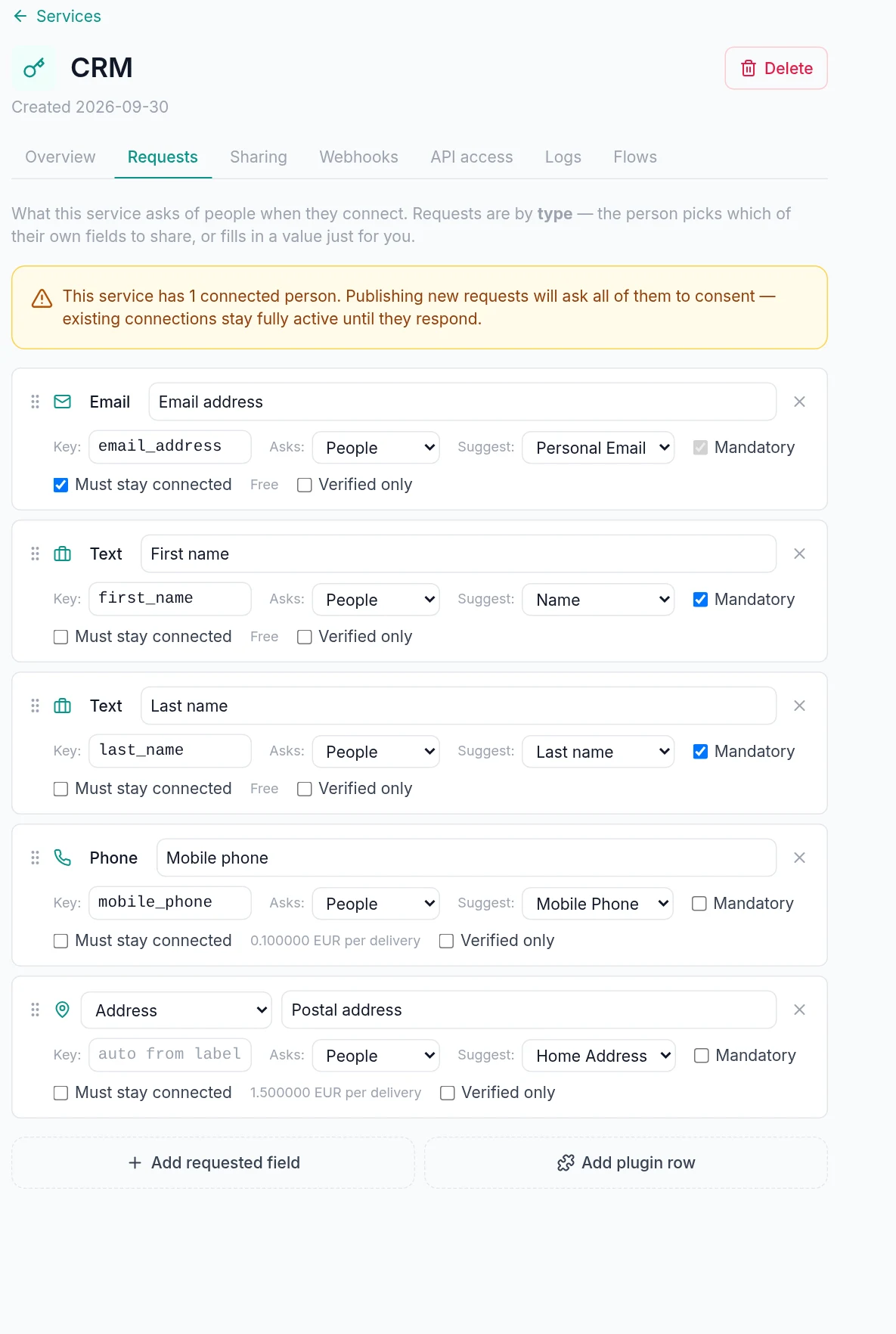
On the service's Requests tab, add the fields you want from connecting people. Give each a stable slug — that slug is your contract and the key every value comes back under (rename the label later all you like; the slug never changes). Choose a type, optionally a suggested field, and the one_time / mandatory flags. Publish the draft.
This is the only place the request shape is defined — your code just reads values keyed by these slugs. See portal guides → request fields for the field types, suggestions, and draft+publish/consent flow.
3. Register a service API client
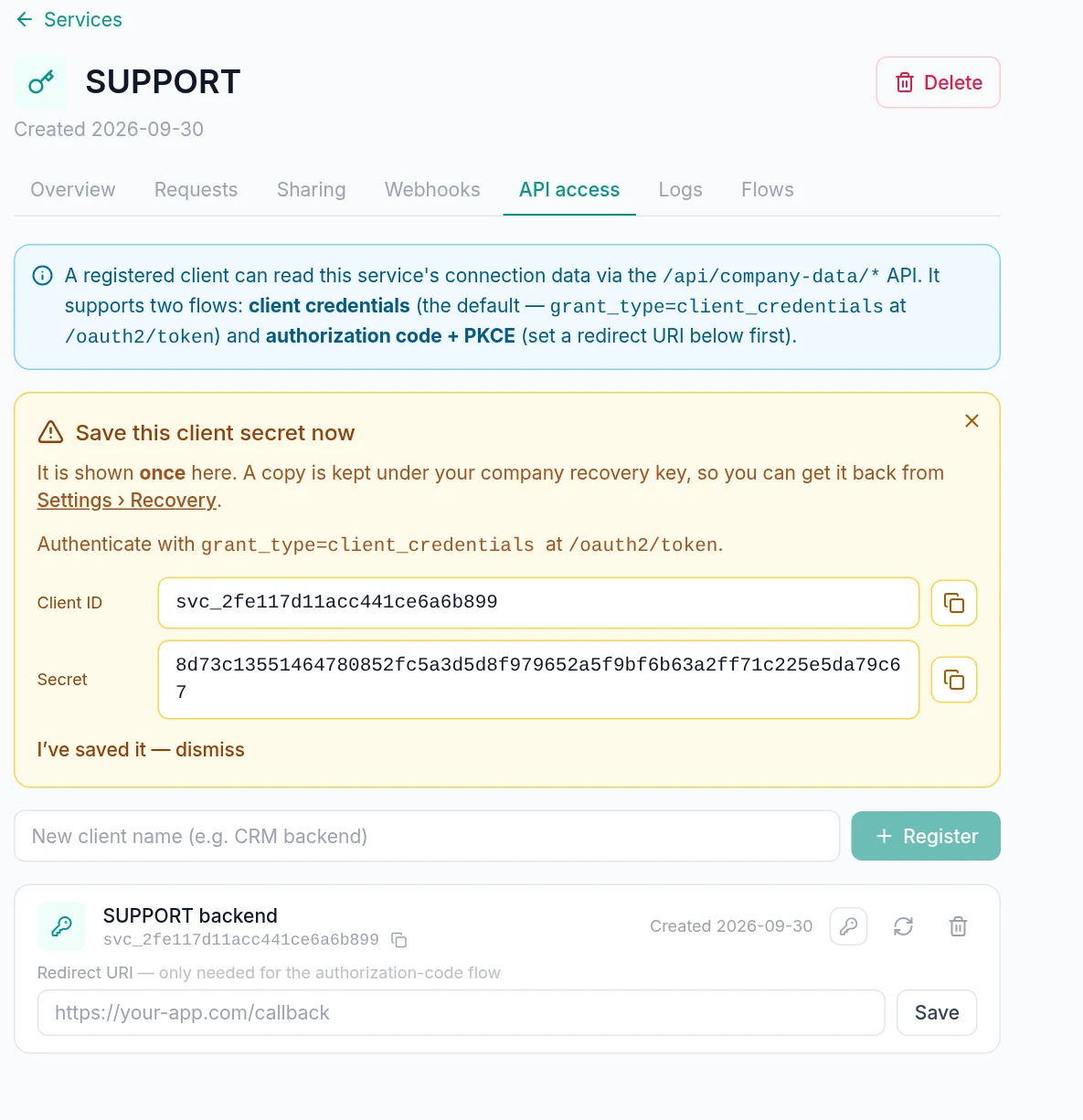
The data API is machine-to-machine, authenticated with OAuth2. On the service's API access tab, register a client — you get a client_id (looks like svc_…) and a secret shown once. This client is scoped server-side to this one service, so every call is implicitly that service's data; no per-request scoping needed.
It uses the client_credentials grant. Full detail — including the deny-all→whitelist model and token lifetime — is on the Authentication page.
4. Write your config.json
Every SDK is driven by one JSON file with the same snake_case keys. It holds your credentials and your service private key — and no SDK method ever takes a key, passphrase, or secret as an argument; everything comes from here. The minimum:
{
  "api_url": "https://api.allme.fyi",
  "client_id": "svc_1a2b3c…",
  "client_secret": "…",
  "service_private_key": "./service-CRM.pem",
  "key_passphrase": "…",
  "cache_dir": "./allus-cache"
}
Any field can be overridden by an ALLUS_* env var (e.g. ALLUS_CLIENT_SECRET, ALLUS_KEY_PASSPHRASE), so secrets needn't live in the file. A missing/invalid config, an unreadable PEM, or a wrong passphrase fails fast at construction (ConfigError). The full key reference — including account_private_key, webhooks, and format — is on the SDKs page (the canonical config.json).
api_url is the platform's global front door, and it is the only base you configure. Your token is minted at your company's home region and the token response names that region's base; the SDK targets it for every data call from then on. If you call the API without an SDK, do the same — Regions has the rules and the 421 the front door answers a data call with.
5. Install an SDK
Pick your language. The choice in the tabs below is remembered across every code block on every page.
# Requires Python ≥ 3.11 — a system/Homebrew Python refuses a bare
# `pip install` (PEP 668), so install into a virtualenv:
python3 -m venv .venv && source .venv/bin/activate   # Windows: .venv\Scripts\activate
pip install allus-company-data
# Requires Node ≥ 18 (built-in fetch + node:crypto); ships dual ESM + CommonJS
npm install @allus-fyi/company-data# Requires Go ≥ 1.26 — `go get` adds to an existing module:
go get github.com/allus-fyi/company-data-go@latest
# Starting from scratch instead of an existing module?
mkdir my-integration && cd my-integration
go mod init my-integration
go get github.com/allus-fyi/company-data-go@latest# .NET 8.0+ — not on NuGet yet; reference it from the GitHub repo:
git clone https://github.com/allus-fyi/company-data-csharp.git
dotnet add reference company-data-csharp/src/Allus.CompanyData/Allus.CompanyData.csproj# Java 21+ — not on Maven Central yet; build from the GitHub repo:
git clone https://github.com/allus-fyi/company-data-java.git
cd company-data-java && mvn -q install # then: implementation 'fyi.allme.allus:company-data:0.1.0'# Requires PHP ≥ 8.1 with ext-openssl + ext-json; PSR-4 autoloaded
composer require allus/company-data6. Fetch your first updates
Construct the client from your config, then drain the change feed. process_changes pulls every pending change, decrypts it with your service key, and hands them to your callback one at a time, acking each only after your code returns. It returns when the feed is empty — there's no daemon; you schedule re-runs.
from allus_company_data import Client

client = Client.from_config("config.json")

def handle(change):
    # one update at a time: event, person, slug, value, live, at
    print(change.event, change.person_id, change.slug, change.value,
          "live" if change.live else "snapshot", change.at)

client.process_changes(handle)   # returns when the feed is empty
import { Client } from '@allus-fyi/company-data';
const client = Client.fromConfig('config.json');
await client.processChanges((change) => {
// event, person, slug, value, live, at
console.log(change.event, change.personId, change.slug, change.value, change.live, change.at);
});client, err := companydata.FromConfig("config.json")
if err != nil {
log.Fatal(err)
}
err = client.ProcessChanges(func(c companydata.Change) error {
// c.Event, c.PersonID, c.Slug, c.Value, c.Live, c.At
fmt.Println(c.Event, c.PersonID, c.Slug, c.Value, c.Live, c.At)
return nil // nil ACKS; an error RETRIES → then dead-letters
}, companydata.PumpOptions{})using Allus.CompanyData;
using var client = Client.FromConfig("config.json");
await client.ProcessChangesAsync(async change =>
{
// change.Event, change.PersonId, change.Slug, change.ValueObj, change.Live, change.At
Console.WriteLine($"{change.Event} {change.PersonId} {change.Slug} = {change.ValueObj}");
await Task.CompletedTask;
});import fyi.allme.allus.companydata.Client;
Client client = Client.fromConfig("config.json");
client.processChanges(change -> {
switch (change.event()) {
case "field_updated" ->
System.out.printf("%s %s = %s (live=%s, at=%s)%n",
change.personId(), change.slug(), change.value(), change.live(), change.at());
case "field_deleted", "connection_deleted" ->
System.out.printf("%s dropped %s%n", change.personId(), change.slug());
default ->
System.out.printf("%s %s%n", change.event(), change.personId());
}
});<?php
require 'vendor/autoload.php';
use Allus\CompanyData\Client;
use Allus\CompanyData\Model\Change;
$client = Client::fromConfig('config.json');
$client->processChanges(function (Change $change): void {
// one update at a time: event, person, slug, value, live, at
printf("%s %s %s\n", $change->event, $change->personId, $change->slug ?? '—');
}); // returns when the feed is emptyfield_updated change carries a person id, your request slug, the decrypted typed value, and whether it's live (auto-updating) or a one-time snapshot. Connection and consent events arrive on the same feed. The platform deleted those rows as it handed them to you, and the SDK durably buffered them first — so a crash mid-batch replays exactly what wasn't acked, nothing lost.List existing connections (optional)
The change feed is your primary, real-time channel. For an initial full sync or occasional reconciliation, iterate every connected person — lazily and auto-paged. Each value is already decrypted and keyed by your slug.
for conn in client.connections():
    print(conn.display_name, conn.person_id)
    for slug, val in conn.values.items():
        print(f"  {slug} = {val.value!r}  (live={val.live})")
for await (const conn of client.connections()) {
console.log(conn.displayName, conn.personId);
for (const [slug, val] of Object.entries(conn.values)) {
console.log(` ${slug} = ${JSON.stringify(val.value)} (live=${val.live})`);
}
}conns, errc := client.Connections(ctx, 100, 0)
for conn := range conns {
fmt.Println(conn.DisplayName, conn.PersonID)
for slug, val := range conn.Values {
fmt.Printf(" %s = %v (live=%t)\n", slug, val.Value, val.Live)
}
}
if err := <-errc; err != nil {
log.Fatal(err)
}await foreach (var conn in client.ConnectionsAsync())
{
Console.WriteLine($"{conn.DisplayName} {conn.PersonId}");
foreach (var (slug, val) in conn.Values)
Console.WriteLine($" {slug} = {val.ValueObj} (live={val.Live})");
}for (Connection conn : client.connections()) {
System.out.println(conn.displayName() + " " + conn.personId());
conn.values().forEach((slug, val) ->
System.out.printf(" %s = %s (live=%s)%n", slug, val.value(), val.live()));
}foreach ($client->connections() as $conn) {
echo $conn->displayName, ' ', $conn->personId, PHP_EOL;
foreach ($conn->values as $slug => $val) {
printf(" %s = %s (live=%s)\n", $slug,
is_scalar($val->value) ? (string) $val->value : json_encode($val->value),
$val->live ? 'true' : 'false');
}
}connections. The connections / connection(id) endpoints are heavily rate-limited — use them for the initial sync and occasional reconciliation only. For ongoing updates, poll the change feed (which is generously rate-limited and the right tool) or use webhooks. See the rate-limit tiers on the Service API reference.Run it on a schedule
There is no follow/daemon mode by design — process_changes returns when the feed empties, and you decide how often to re-run it: a cron job, a systemd timer, or a simple loop. The feed is cheap to poll, and the SDK's crash-safe buffer means a re-run safely picks up exactly what's new (and replays anything a previous crash left un-acked). Because delivery is at-least-once, your handler must be idempotent — dedup on change.id.
The full consumption model (the durable buffer, dead-lettering, retries, exactly-once on your side) is documented on the SDKs page (the changes pump).
Where to next
- Authentication — tokens, the whitelist model, key handling.
- Service API reference — every endpoint, JSON/XML, rate-limit tiers, and the change-feed semantics. Try it in the live API explorer ↗.
- SDKs — the canonical config reference, per-language quickstarts, and the changes pump in depth.
- Webhooks — receive pushes instead of polling (consume one channel, not both).
- Contract flows — run a published branching flow with a connected person over the API, ending in shared data or a signable contract.
- Account automation clients — provision an OAuth client to create services and edit your company profile & fields over the API, instead of the portal UI.
- Portal configuration guides — the illustrated walkthroughs for everything in steps 1–3.